Change without losing prior data WhatApp number

You can use the Change Number feature to change the WhatApp number and chat with the same phone on the same phone. Just want to have your phone on it._
  • Insert a new SIM phone and start your WhatsApp Account.
  • Click on the Account Options in Settings. Then two boxes appear, enter the old phone number in the box above and enter the new number in the box below.
  • Click on the option which will appear next to it.
  • Revert to your new number. Now you can use Whatsapp from the new number.

If you have a new phone, you will have to back up WhatsApp App in the previous phone and then it will have to be restored in a new phone.


Preview feature that will come with Whatsapp.


With the help of Whatsapp Messenger, the preview will be a new feature soon, with the help of Fake News ...

WabetaInfo, which accurately predicts all the features of Whatsapp, gives the information about the preview ...

What is the purpose of the review?

  • There is a large number of fakes in exchange for whitespace. Considering the same problem the preview feature will work.
  • It will show a preview before sharing a post in any group or personalized chatting. In this time it is possible to delete information related to the linked link, even before sending it to the concerned user if it is not known.
  • This feature will be presented for the first time in a few days for the beta version, then it will be made available to all users

Good News for Whatsapp Group Admin

Whatsapp rates are updated on a few days' intervals for new users. Now Whatsapp has brought 'Restricted Group' feature. Presently, this feature is available in both the platforms of Android and iOS.

There has been a lot of controversy in the past few days due to the group on Whatsapp. Some members of the group share some controversial posts and the result is that Group Admin also has to suffer. So many people avoided making the group. Apart from this, many groups do not share controversial content, although some members are sharing posts, photos and videos all through the valley day. Many people ram ram to the group when they are tired of all these things.

That's what Whatsapp has spotted, and has brought a new feature related to it.

What is 'Restricted Group'?

Group admin will get special rights from WhatsApp's 'Restruct Group' feature. When the 'Restrict Group' feature is actually implemented, the group admin will breathe a sigh while driving the group genuinely. Because of this feature, the group can post a controversial post sharing in the group. By doing so, members may read posts, view other members of the group, but they can not post anything.

When this feature is opened for all users, it can be used in the group's settings and used.

In the meantime, this feature will be useful to prevent posting of controversial posts or group posts by the group.

Maharashtra Vishva News

Source by Dailyhunt

Now run on your PC, Whats-app has two accounts, this is the easiest way

Do you want to run 2 Whats-app accounts simultaneously on your PC?

There are many ways in which you can use 2 Whats-app account simultaneously on your smartphone. But how to access 2 accounts simultaneously on the PC, this is the biggest question. In such a way, our news is from your work. We are going to tell you some easy ways you can run 2 accounts simultaneously on your PC. For this you need to take care of 2 things. First of all, the latest versions of Whats-app version of your phone, and the second one has a stable Internet connection in your mobile. So, knowing about these methods,

Step 1
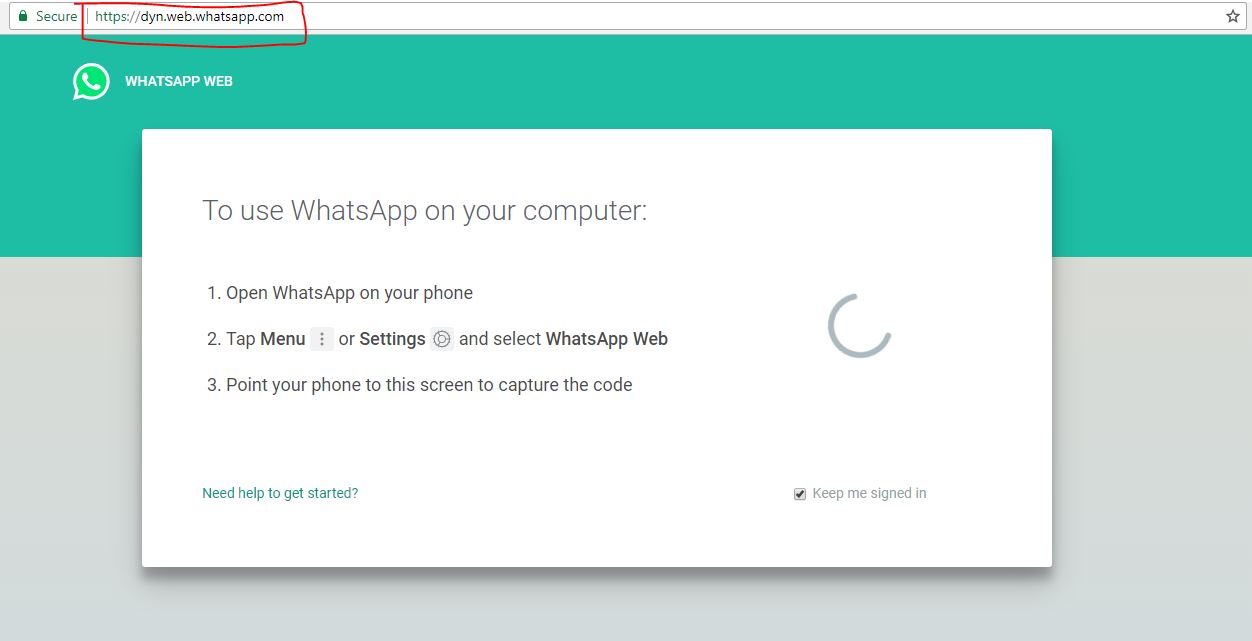
Go to your PC's browser and type http://web.whatsapp.com.


Step 2

You have to scan your QR code here. Go to WhitesAP account on your mobile and scan QR code.


Step 3

Now open the browser's new tab to run another WhatsApp account.

Step 4


In this new tab, type http://dyn.web.whatsapp.com and enter it.

Step 5

You also need to scan your QR code here. Now scan your QR code on your mobile with another WhatsApp account. After this you will be able to run two Whatsapp accounts on your PC simultaneously.

WhatsApp Increase Deadline To Delete Messages Until 68 Minutes For Android Users

Send a message to WhatsApp, roam around and then delete it, no one will know it

WhatsApp has released another update for its beta users. Users of Whatsapp version 2.18.69 will now be able to delete the message even after 68 minutes of sending the message. Explain that the company has recently released the Delete For Everyone feature. So far, the message was 420 minutes i.e. 7 minutes for the delete date, which has now been 68 minutes.

This information is given through Whatsapp tracker WABetaInfo through its blog. According to the information given in the blog, the new update has only been released for Android's beta users, and iOS users will have to wait now. Delete for Everywhere feature means that after some time you send the message, you can delete it for yourself and also for the person you sent it. In this, there is a Delight for Me and Delete for Everyone option.

Apart from this, stickers and emoji have also been updated on the beta version of Whatatsapp. This time emoji has been modified and some new stickers have also come. However, the common users will have to wait for this, because the testing of these two features is currently being done on the beta version.

Read source

Now send money with message on WHATSAPP, start up UPI feature, use this way

The UPI (Universal Payment Interface) has begun on Whatsapp Beta for Android and iOS users. Through this feature, users can make money transactions with WhatsApp. The combination of the UPA and Whatsapp is being seen as a major step in the world of digital payments. After the launch of the Kaspless Campaign, many platforms of digital payment has been started in the country, the names of which are named as PetiM, Google Teas. To make money transactions with WhatsApp, both users (money-makers and money-takers) must have this payment feature.

This feature is currently available only to the limited users of
Whatsapp Beta
. This feature is given in the section containing attachments of the chat window. Now the option of the UPA has been added to the list of galleries, videos and documents. When a click opens, a window opens, where the options of banks appear. You can then join the UPA through your bank account. The new user user has to make an authentication pin here. If you have not used it yet, then you will have to generate a UPA account by going straight to the UPA or the bank's website or app.

First of all, the money you send, go to the Whatsapp profile.

Next, select the attachment icon on the chat window

Now the payment option will be visible. Clicking on it will bring you terms and conditions. Accept them.

After this the user has to verify his number.

You can choose your bank in the list.
Images by Google

WhatsApp can shut down on these phones once December 31, check if yours is within the list

WhatsApp can finish its variety of smartphone platforms by the top of this year. the corporate has confirmed this web log on its official web log post. The electronic communication app can pull its mobile platforms like BlackBerry OS, BlackBerry ten, Windows Phone eight.0 and older on December 31, 2017. In straightforward words it means users won't be ready to use WhatsApp once December 31, 2017.

WhatsApp initial declared regarding these obsolete mobile platforms within the year 2016. It aforesaid that it'll finish support for these mobile platforms. However, it absolutely was later updated its web log stating that it extended its point in time to Gregorian calendar month thirty, 2017. This point in time was more updated to thirty one December 2017.

"This may be a powerful call for United States of America to create, however the proper one so as to grant individuals to friends, family, and wanted ones mistreatment WhatsApp. If you utilize one in every of these affected mobile devices, to a more moderen automaton, iPhone, or Windows Phone before the top of 2016, WhatsApp is on its web log.

This is the mobile OS that may stop supporting WhatsApp by the top of the year:

- Nokia Symbian S60 once Gregorian calendar month thirty, 2017

- BlackBerry OS and BlackBerry ten once December 31, 2017

- Windows Phone eight.0 and older once December 31, 2017

- Nokia S40 once December 31, 2018

- automaton versions a pair of.3.7 and older once Feb one, 2020

Article by India Today and rewrite by small seo tools.

Thanks

Messaging app woesapp's group admin can get more strength soon.

Messaging app woesapp's group admin can get more strength soon. Whatsapp is going to bring a new feature for every group admin. Under this change, the group admin will now be able to decide which members of the group can now change their subject, icons and states.

According to WABetaInfo.com, a fan site has tested this new feature of WhatSapp. Whatsapp has subscribed to this new update via Google Play Beta Program 2.17.387. According to Google Play Store these features are currently available for testing. This feature will be available to users only when WhatsApp will enable it.

Whatsapp has already announced the advance feature for promoting group management before. If you think of recent reports, What's amazing is what's going to be for fast users. If WABetaInfo thinks that Whatsapp is also testing for delete feature.

A new feature of Whatsapp, now you know your location

Now your friends will be able to know your location on WhatsApp, because WHATSAPAP has launched a new live location feature.

WhatsappApatch is a new feature and is encrypted. It is in your hands that someone should see your live location and no one else. This feature is the short term. You can turn on the live location when you want it. If you are traveling, people nearby will know where you are on the journey and you can close this feature after the journey is over. Not only this, your live location can also send messages to your friends. You can also share it on a group. This new feature of WhatsAppApps will help you to stay connected with your friends continuously.

Use this feature

Go to Apple Play Store or Google Play Store. Go there and update your WhatsApp update. Then go to Whatsapp's contact. There you can update this live location feature. Also, you can share this app with your friends by selecting it. At present, this feature is only for Android and

I can use it on IOS.